Documenting Microservice Integration with MSAdoc
Note: This is an opinionated summary of a research paper by the first author. The opinions expressed exceed the scientific insights from the study. You can download the original study here.
TL;DR
- Problem: Microservice documentation in a central place becomes outdated quickly and is scattered across multiple places
- Solution: MSAdoc enables decentralized documentation in code repositories while aggregating it centrally
- Key Features: JSON-based configuration, automatic architecture diagrams, technology-agnostic approach
- When to Use: Projects with multiple microservices struggling with documentation consistency
🔗 Try MSAdoc on GitHub | Live Demo | Demo Video
The Documentation Problem
If you’ve worked on a microservice-based project, you know the pain: documentation is scattered across wikis, README files, Confluence pages, etcetera. Architecture diagrams are outdated the day after you draw them. Finding out which team owns a service requires asking around. And central documentation? It’s either wrong or doesn’t exist.
This happens because microservices are inherently decentralized. Each team works autonomously on their services, but documentation tools assume centralized control. Teams resist updating central wikis because it’s friction—context switching away from their code, finding the right page, hoping they don’t break someone else’s documentation.
The core problems:
- Documentation is manually maintained and quickly becomes stale
- Teams don’t know where to document or can’t find existing documentation
- No single source of truth for the overall architecture
- Enterprise tools aren’t built for the distributed nature of microservices
- Who owns what? Responsibility is unclear when things break
MSAdoc: Documentation That Stays Close to the Code
MSAdoc takes a different approach: each team documents their microservice in their own code repository, and the tool automatically aggregates everything into a central, browsable view.
Think of it as “infrastructure-as-code” for documentation. Just like you version your Terraform files alongside your code, you version your microservice documentation alongside your code. When you deploy a new version of your service, you also deploy updated documentation.
How It Works
Each team documents its microservice within its code repository using a msadoc.json file. CI/CD pipelines automatically send these files to an MSAdoc server that aggregates documentation across all microservices.
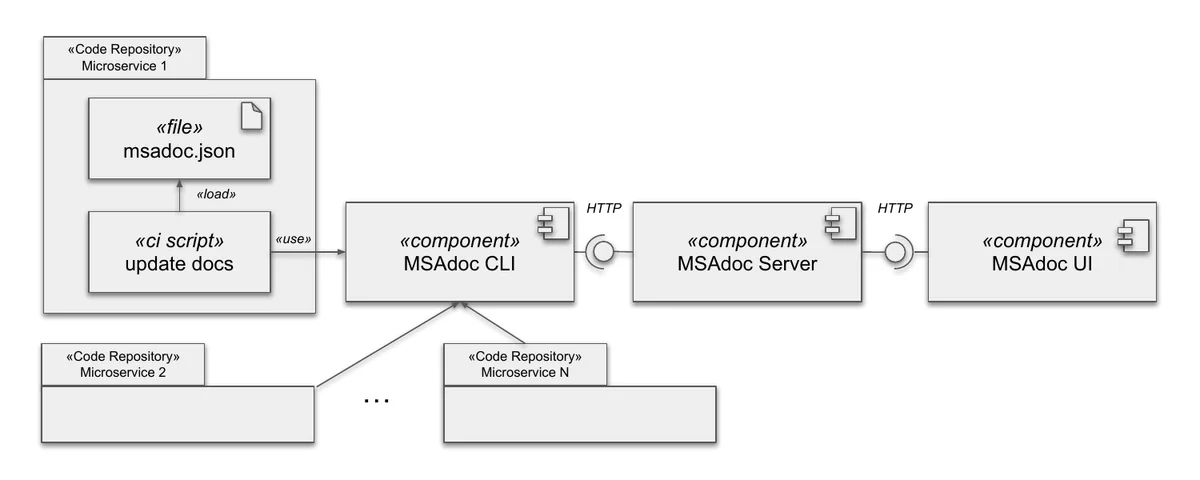
The workflow is simple: each microservice repository contains a msadoc.json file that gets loaded by CI scripts and sent to the MSAdoc server via HTTP (e.g., by using the MSAdoc CLI). The server aggregates all documentation and makes it accessible through the MSAdoc UI.
{ "$schema": "...", "name": "NotificationService", "repository": "github.com/...", "group": "backend.notification", "providedAPIs": ["/notifications/configs"], "publishedEvents": ["notification.config.created"], "subscribedEvents": ["load.execution.success"], "responsibles": ["john@doe.org"], "responsibleTeam": "notifications"}What MSAdoc Gives You
1. Decentralized Documentation
Documentation lives close to the code, making it easier to keep in sync and versioned by default. Each microservice team maintains their documentation in their own repository, reducing the friction of updating central wikis or architecture documents that quickly become stale.
The MSAdoc UI provides a centralized view where you can browse all microservices, view their metadata, documentation links, and understand team responsibilities:
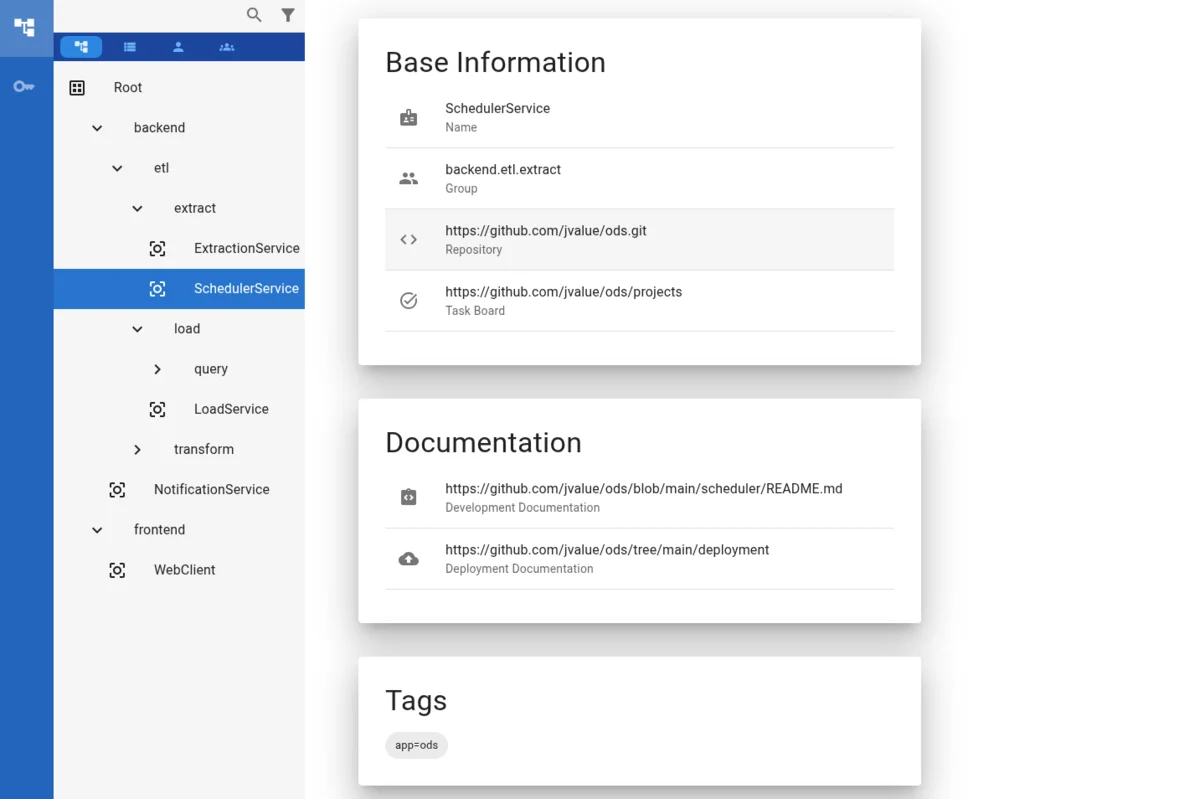
This approach combines the best of both worlds: decentralized maintenance with centralized discoverability.
2. Technology-Agnostic JSON Format
Microservices embrace polyglot architectures—one team uses Java, another uses Python, another Go. MSAdoc doesn’t care. By using JSON as the documentation format, any team can participate regardless of their tech stack.
Better yet, you can specify a $schema field that enables auto-completion and validation in most editors out of the box. This ensures consistency: every team documents the same fields in the same way.
3. Automatic Architecture Diagrams
MSAdoc automatically generates architecture diagrams by linking provided and consumed APIs across microservices. By documenting which APIs and events each microservice provides and consumes, MSAdoc can automatically visualize the integration landscape.
For example, MSAdoc generates Sankey diagrams that show the flow of APIs and events between microservices:
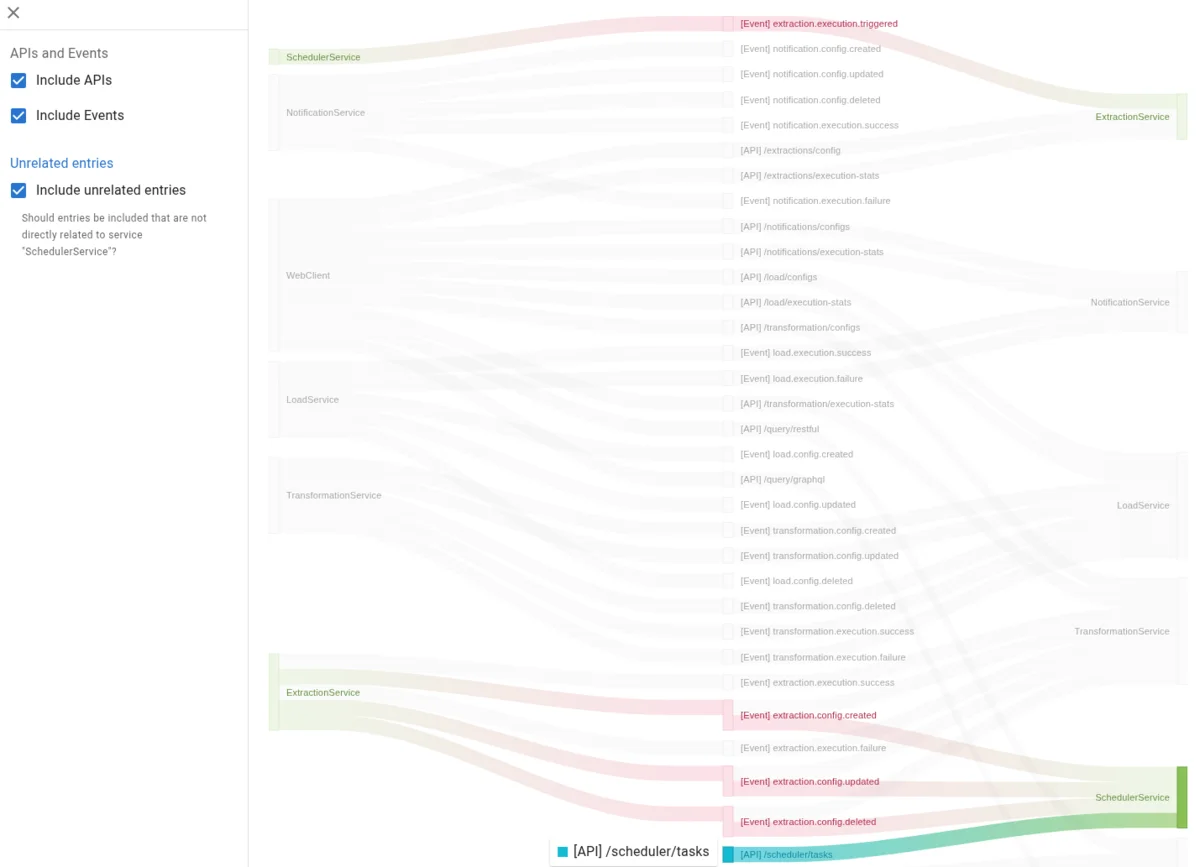
This higher-order documentation is automatically generated from the individual msadoc.json files, ensuring it stays up-to-date as teams update their microservice documentation. No more manually maintaining architecture diagrams that are outdated the moment you finish drawing them.
4. Views for Different Stakeholders
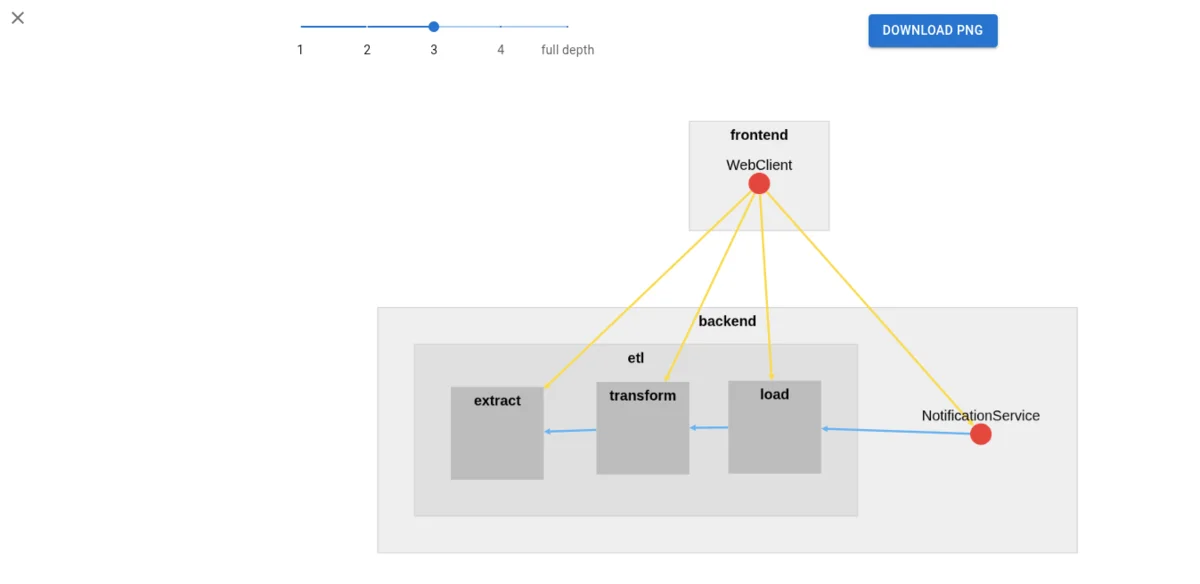
Different stakeholders need different views of the system. MSAdoc supports hierarchical grouping (like bounded contexts or team boundaries) and filtering to show only relevant microservices.
The bird’s-eye view allows you to see the system at different levels of abstraction, from high-level groups down to individual microservices:
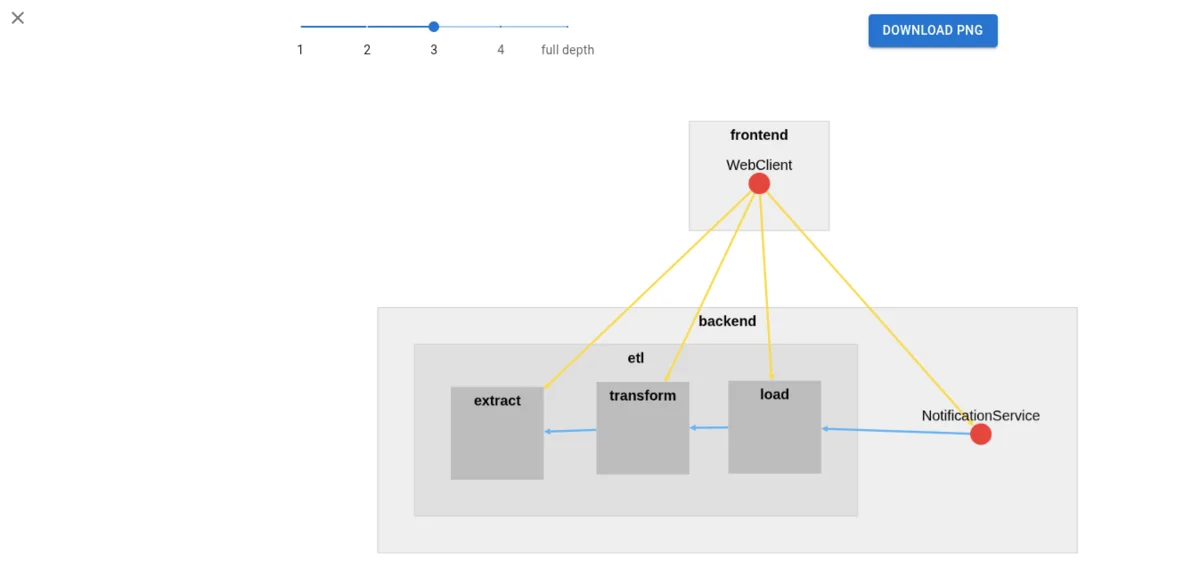
You can incrementally drill down into groups to understand the architecture at the right level of detail for your needs, whether you’re a technical lead looking at the overall system structure or a developer focusing on a specific subsystem.
5. Clear Ownership
One of the most practical features: MSAdoc tracks who’s responsible for each microservice. When something breaks at 3 AM, you don’t want to play detective figuring out which team to page.
Each msadoc.json file specifies responsibles (individual contacts) and responsibleTeam. The UI lets you browse from teams to their services and vice versa—making it trivial to understand ownership boundaries.
6. Extensible for Your Needs
Every project has unique documentation requirements. MSAdoc supports:
- Tags for filtering and categorization (e.g., “critical”, “deprecated”, “experimental”)
- Extensions for custom fields specific to your organization (e.g., which products use this service, compliance tags, cost centers)
The tool provides structure without being prescriptive—you can adapt it to your workflow.
When Should You Use MSAdoc?
MSAdoc is a good fit when:
You have multiple teams working on different microservices with decentralized governance. If you’re a single team with three services, a simple README probably suffices. But once you hit double-digit services across multiple teams, the coordination overhead becomes real.
Documentation is scattered everywhere. Your team knows where their docs are, but finding documentation for another team’s service requires Slack messages and tribal knowledge. MSAdoc provides a single entry point.
Central documentation dies quickly. Someone creates a beautiful architecture diagram or wiki page, and it’s outdated within weeks because teams don’t update it when they make changes. MSAdoc keeps documentation close to code where teams are already working.
You embrace polyglot microservices. Different services use different languages and frameworks. Language-specific documentation tools don’t work across the board. MSAdoc’s JSON format works everywhere.
Current Limitations
MSAdoc solves the static documentation problem well, but it doesn’t currently handle runtime data. You won’t see:
- Which instances are currently running
- Performance metrics or health status
- Real-time dependency graphs based on actual traffic
The plan is to add an API where deployment platforms (Kubernetes, Cloud Run, etc.) can report running instances and map them to microservices. This would bridge the gap between design-time and runtime views.
For now, combine MSAdoc with your existing observability tooling. MSAdoc tells you what should be, your monitoring tells you what is.
Practical Takeaways
1. Co-locate Documentation with Code
The infrastructure-as-code movement taught us that keeping infrastructure definitions with application code reduces drift. The same principle applies to documentation. When documentation lives in the same repository as the service it describes, updating both together becomes natural.
MSAdoc formalizes this pattern for microservice metadata.
2. Standardize the Entry Point, Not Everything
You don’t need teams to document everything the same way. But having a standard entry point—a msadoc.json file with basic metadata—gives you discoverability. From there, teams can link to their preferred documentation format (README, wiki, Swagger docs, etc.).
Lightweight standards are easier to enforce than heavyweight ones.
3. Automate or It Won’t Happen
If updating documentation requires manual steps separate from deployment, it won’t stay current. Integrate documentation updates into your CI/CD pipeline so they happen automatically.
The best documentation process is the one nobody has to remember.
4. Start with the Minimum
Don’t try to document everything on day one. Start with:
- Service name
- Responsible team
- Repository link
- Maybe a few key APIs
Add more fields as you discover what’s valuable. MSAdoc’s extension mechanism means you can always expand later without breaking existing documentation.
Learn More
📄 Download the full paper (PDF)
Published in Proceedings of the 16th International Conference on Internetware (Internetware 2025), June 20-22, 2025, Trondheim, Norway.
Full Citation:
Schwarz, G.-D., & Riehle, D. (2025).Documenting Microservice Integration with MSAdoc.In Proceedings of the 16th International Conference on Internetware (pp. 589-592).https://doi.org/10.1145/3755881.3755980License: This article is published as open access under the CC BY 4.0 license, which permits use, sharing, adaptation, distribution and reproduction in any medium or format, as long as you give appropriate credit to the original authors and source.
Resources:
- Open Source Tool: https://github.com/riehlegroup/msadoc
- Demonstration Video: https://youtu.be/aUMS5ClehMo
- Live Demo: https://riehlegroup.github.io/msadoc
This research was conducted at Friedrich-Alexander-Universität Erlangen-Nürnberg, addressing documentation challenges in microservice-based projects by building an open source tool that implements several best practices from prior research.